
Valve Steam Machine Review: Premium Hybrid PC or Niche Collector’s Item?
Priced higher than both the PlayStation 5 Pro and Xbox Series X, Valve’s long-awaited returns to living-room hardware have officially arrived in the form of the new Steam Machine. With initial stock instantly selling out globally, this compact mini-PC hybrid attempts to bridge the gap between PC flexibility and console convenience.
However, entering the market at $1,050 for the base 512 GB model and $1,350 for the 2 TB variant—with the updated Steam Controller sold separately for an extra $80—Valve is positioning this device at a distinct premium.
Is this sleek living-room cube the ultimate way to access your Steam library, or does the high price tag make standard consoles and custom PC builds more appealing? Here is our full breakdown.
Unboxing, Build Quality & Customization
The base packaging keeps things straightforward. Inside the primary box, you will find:
- The Steam Machine unit
- A standard power cable
- An HDMI cable
- Quick-start documentation
(Note: The standalone Steam Controller bundle includes a dedicated wireless USB receiver and a Type-C charging cable.)
Valve Steam Machine
- Seamless living room gaming experience powered by SteamOS
- Impressive 1080p and 1440p gaming performance in a compact form factor
- Quiet cooling architecture even under extended heavy loads
- Broad PC library access with seamless Proton compatibility
- Certain anti-cheat titles remain unsupported on Linux
- Higher price point compared to mainstream entry-level consoles
- Limited internal hardware upgradeability for future GPU iterations
The Valve Steam Machine successfully bridges the gap between dedicated home consoles and full-fledged gaming PCs. By combining refined SteamOS software with powerful, quiet hardware, it delivers a superior couch gaming experience for PC enthusiasts. While non-Steam launchers require minor workarounds, it remains an outstanding pre-built solution for living room entertainment.
Compact Footprint & Magnetic Panels
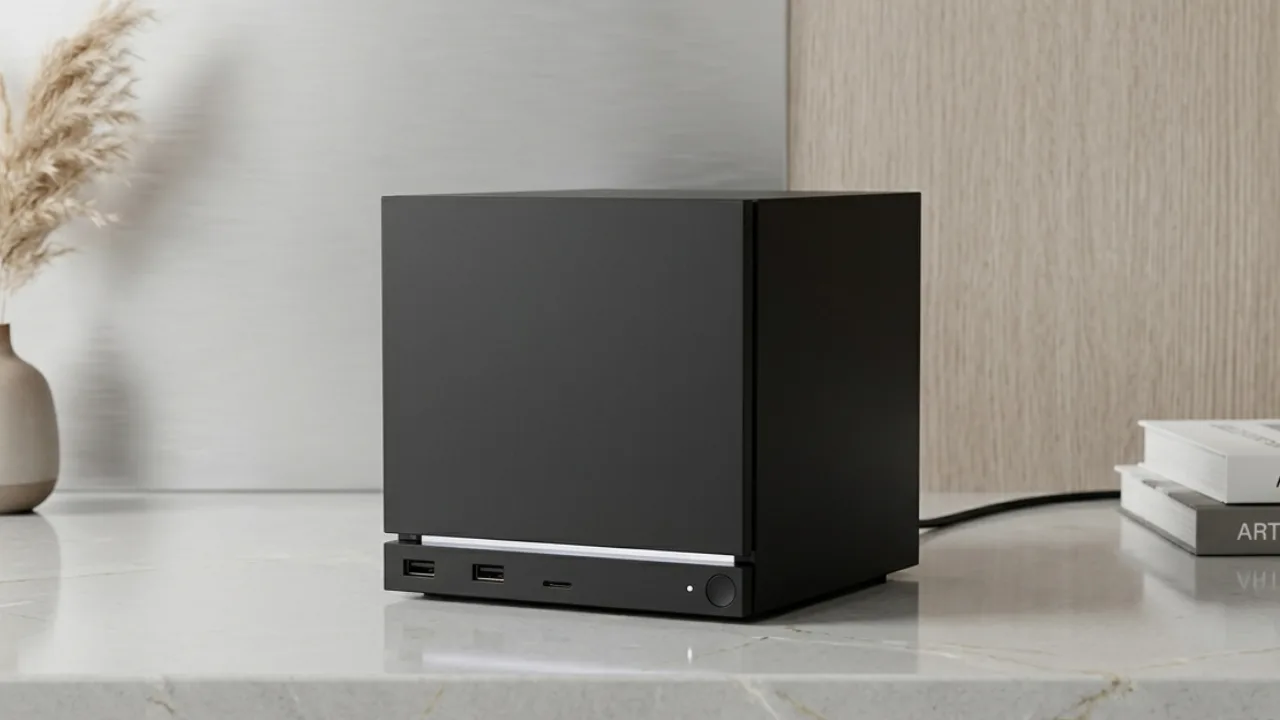
Physically, the device resembles a sleek, matte black cube with a footprint roughly similar to an Apple Mac Studio. The outer shell uses a textured plastic shell paired with a metallic rear plate, making it one of the most compact living-room gaming systems available.
For the higher-tier 2 TB edition, Valve includes magnetically attached decorative side panels (such as fabric and wood-grain textures). Because the CAD models for these magnetic covers are publicly accessible, users with 3D printers can print customized replacement plates at home.
Port Selection, Hardware & Connectivity
Despite its tiny enclosure, the Steam Machine offers a competitive selection of connectivity options across its front and rear panels.
Connectivity Breakdown
| Panel Location | Included Interfaces & Connectivity |
| Front Panel | 2x USB-A (3.2 Gen 1), MicroSD Card Reader, Power Button with RGB LED Strip |
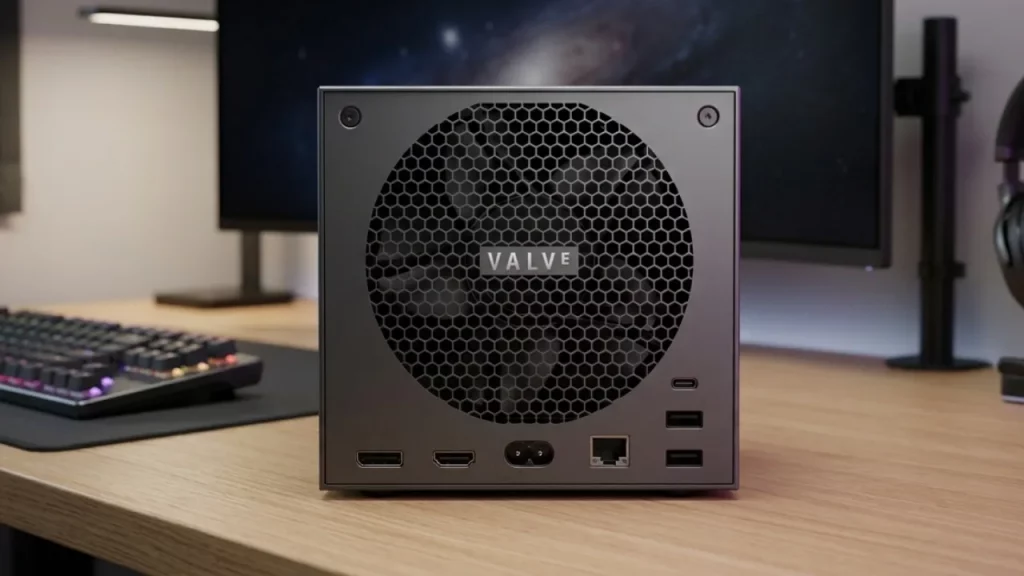
| Rear Panel | DisplayPort 1.4, HDMI 2.0, Gigabit Ethernet, 2x USB-A 2.0, 1x USB-C (10 Gbps), Power Input |
Integrated Wireless Receivers
The internal layout houses dedicated dual Wi-Fi antennas for game downloads alongside an integrated 2.4 GHz wireless receiver specifically engineered for the Steam Controller. This native connection reduces input latency compared to standard Bluetooth pairings without requiring external USB dongles.
Hardware Performance & Thermal Management
Under the hood, the Steam Machine operates on midrange PC hardware tuned for efficiency within a small form factor.
Core Hardware Specs
- GPU: AMD Radeon RX 7600 mobile-equivalent architecture with 8 GB VRAM
- System Memory: 16 GB DDR5 (5600 MHz) SO-DIMM RAM
- Storage Options: M.2 2230 SSD (with structural clearance inside the case for standard M.2 2280 drives)
- Thermals & Acoustics: A massive internal heatsink and blower fan keep thermal levels around 70°C under load while maintaining near-silent acoustic output comparable to a PS5 Slim.
Memory & Upgrade Limitations
While the SSD and laptop-grade SO-DIMM RAM modules can be upgraded by opening the chassis, the CPU and GPU are soldered directly to the motherboard. In modern titles running at 1440p or 4K resolutions, the 8 GB VRAM limit serves as the primary hardware bottleneck, requiring careful adjustment of graphical settings and upscaling technology like AMD FSR.
Software Experience: SteamOS vs. Windows PC
The main selling point of the Steam Machine is SteamOS powered by Proton compatibility layers. It delivers a true console-like “instant resume” experience: turn on the machine via controller, launch into the Big Picture interface within seconds, and pick up right where you left off.
Desktop Flexibility & Limitations
Because SteamOS is built on Arch Linux, users can switch to desktop mode or install Windows via third-party bootloader configurations. However, certain competitive multiplayer games utilizing kernel-level anti-cheat solutions remain incompatible with Linux out of the box.
Real-World Gaming Benchmarks
In real-world gaming tests, performance varies depending on resolution and upscaling settings:
- Cyberpunk 2077: Runs at 1080p on Medium/High settings with stable 60 FPS output. Pushing to 4K requires aggressive FSR upscaling.
- Unreal Engine 5 Titles: Demanding UE5 titles run best at 1080p resolution on Medium settings to maintain a steady 50–60 FPS target.
- Optimized PC Ports: Well-optimized titles reach 60 FPS cleanly at native 1080p or 1440p without frame generation latency.
Who Is the Steam Machine For?
The Valve Steam Machine successfully combines the convenience of a console with the open ecosystem of PC gaming. Its whisper-quiet cooling, compact design, and refined SteamOS software offer a slick living-room experience.
However, at over $1,000 without a bundled controller, it faces strong competition from conventional home consoles and dedicated custom desktop PCs.
Final Takeaway
- Best For: Valve enthusiasts, living-room PC gamers, and users with extensive existing Steam libraries looking for a quiet, compact, pre-built media center solution.
- Consider Alternatives If: You prioritize raw graphical horsepower per dollar, native 4K console gaming, or access to competitive anti-cheat multiplayer titles.
- How to Free Up Storage on iPhone Without Deleting Photos
- How to Fix a Slow Windows 11 PC Without Resetting It
- Keychron V6 Ultra Hybrid 8K Review: The Ultimate Hybrid Gaming Keyboard?
- Nothing Phone (4b) Review: Unique Style or Budget Compromise?
- Valve Steam Machine Review: Premium Price vs. Console Value
